On some packages our first AI markup is 98–99% correct. On others the same AI lands at 30–50%. The model hasn't changed between those runs. The inputs have.
This post covers how our AI markup pipeline works, what we measured on two real packages, and the rules we now use to keep accuracy at the top of that range. We wrote it for estimators who work with the AI every day and for clients who want to know what's happening behind the takeoff.
1. How Our AI Markup Pipeline Works #
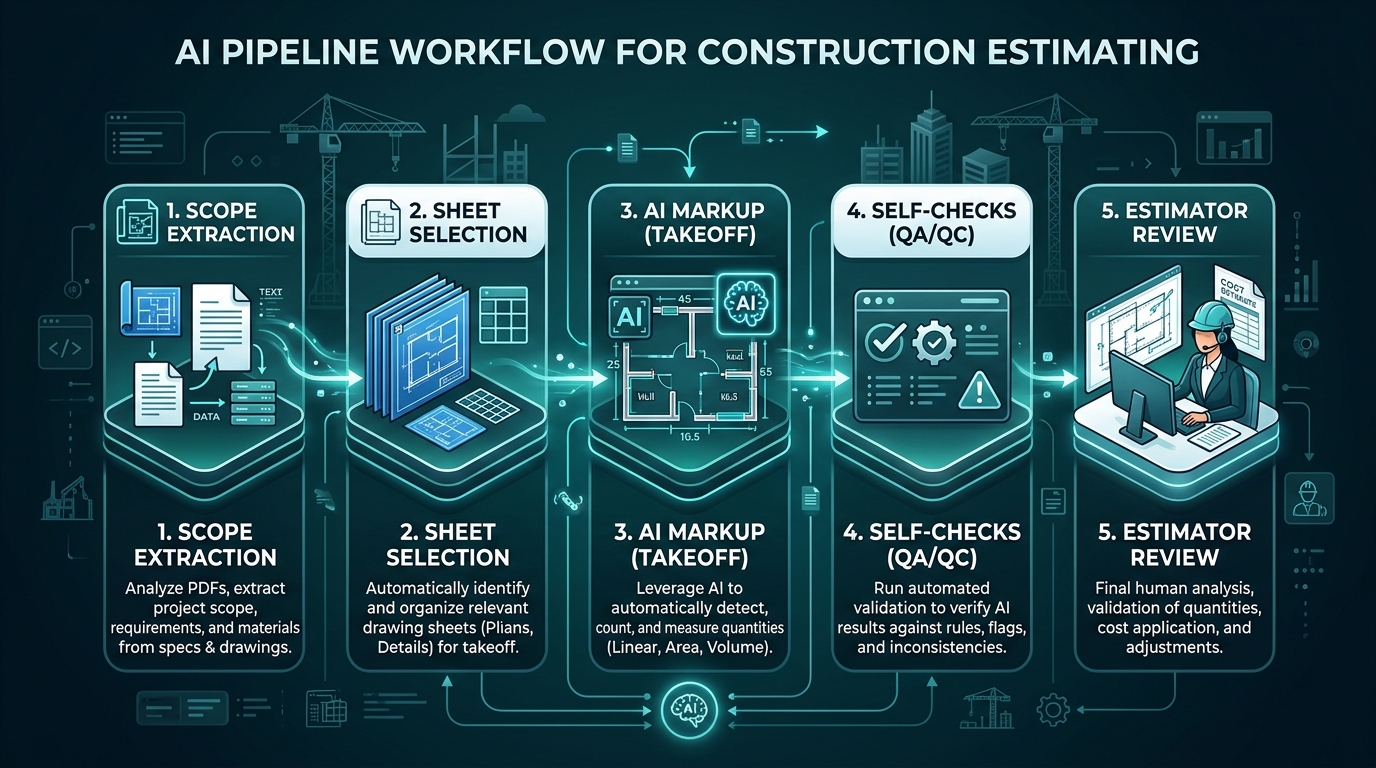
There are two separate skill files, which are reusable instruction sets for the AI:
Reads the tender documents and returns what is and isn't in scope for one trade.
Takes the SOW and drawings, then produces Bluebeam-style markups with legends, QA lines and quantities.
The markup skill also gets a reference job: a finished, human-approved markup from a similar past package. The AI uses it to see what "done" looks like — including label codes, legend layout, measurement conventions and which sheets get tagged.
**The reference job is the biggest single lever on accuracy.** It is also the easiest way to break it.
2. What We Measured #
We compare each AI markup against the estimator's final, corrected markup line by line. The two reviews below are from recent packages. Project details have been removed.
Package A: Landscape (36 line items)
| Measure | Result |
|---|---|
| Line-item accuracy | 86.1% (31 / 36) |
| Individual markup precision | 90.8% (79 / 87 kept) |
| Coverage (recall) | 98.8% (79 / 80 final markups drawn by AI) |
| Elapsed time saved (midpoint) | ~36% (≈1.25 h) |
| Estimator hands-on time saved (midpoint) | ~64% (≈2.25 h) |
Every in-scope area, length and count the AI found was measured exactly right. None of the errors came from geometry. They were all judgement errors:
| Error type | Example | Root cause |
|---|---|---|
| Out-of-scope items measured | Existing street planting outside the site boundary, a tank marked "by others", an existing tree to be retained | No explicit exclusion rule for existing / by others / indicative / outside boundary |
| Over-count on dense symbols | 5 flush valves counted vs 3 actual, because solenoid valve symbols were read as flush valves | Small symbols on a 1:100 sheet, with no cross-check against related items |
| Missed strip | 0.24 m² bed under a cantilever | The AI's own cross-check flagged 9.00 vs 8.91 m² but didn't act on it |
| Unsupported claim | Note said "RFI-01 raised" when no RFI existed | The model filled in a plausible next step it had not actually taken |
Package B: External Cement Sheet Cladding (61 items), Two Attempts
| Category | AI run 1 | AI run 2 | Change |
|---|---|---|---|
| Quantities | 41.2% | 76.5% | +35.3 pts |
| Markups (shapes, QA lines) | 48.1% | 70.4% | +22.3 pts |
| Formatting | 27.3% | 58.3% | +31.0 pts |
| BOQ lines | 20.0% | 40.0% | +20.0 pts |
| Overall | 40.0% | 67.2% | +27.2 pts |
Run 1 and Run 2 used the same model and the same drawings. Between them, we revised the prompt and added a basic reference markup file.
Run 1's total area looked right (+1.6%) but 10 of 17 items were wrong. Over-measures and under-measures cancelled out. A correct total does not mean a correct takeoff. Check line by line.
3. Why Accuracy Swings #
Across our reviews, the variance comes from five input-side drivers:
| Driver | What goes wrong | Typical effect |
|---|---|---|
| Scope ambiguity | SOW doesn't spell out exclusions | AI measures existing, "by others" or adjacent-trade items |
| Reference job mismatch | Reference is from a different trade, house style or drawing type | AI copies the wrong conventions, codes and layouts |
| Context overload | Too many files, sheets or references in one run | Instructions get diluted, coverage drops on later sheets and scope drifts |
| Missing measurement rules | Conventions only exist in estimators' heads | Systematic, repeatable errors (e.g. stopping at fences) |
| Dense symbols / small counts | 1:100 sheets with overlapping fittings | Count errors on small integers, often large in % terms |
Scope, reference and rules are knowledge problems, and we fix them in the skill files. Context overload is an engineering problem, and it's the one teams most often get wrong.
4. You Own the Inputs #
Every swing in section 2 traces back to something a person loaded, or didn't. The 293 m² of brick slip in Package B wasn't the AI's choice. It was given 105 sheets when 19 were relevant. Run 2's 27-point gain came from a better prompt and a reference file, not a better model.
So the rule is simple: the estimator who starts the run owns what goes into it. If the output is wrong because an input was wrong, that's an input error, and it gets fixed at the input.
| Input | The run owner checks | If it's skipped |
|---|---|---|
| Scope of Work | Right trade, exclusions written out, checked against the tender documents | AI measures existing or "by others" items |
| Drawing set | Only relevant sheets, current revision confirmed | Scope drift, superseded quantities |
| Reference job | One approved job, same trade and house style | Wrong codes, legends and conventions |
| Measurement rules | Trade conventions are in the skill file before the run | The same error repeated on every job |
| Project updates | Addenda, RFI responses and client emails that change scope are included | AI works from an outdated scope |
**Don't ask "why did the AI get this wrong?" Ask "what did we give it?"**
This isn't about blame. When a review finds an input gap, we log it and fix the checklist or skill file, so the next estimator doesn't hit the same problem.
5. Context Overload, Technically #
What "Context" Is
A large language model works inside a context window: one combined input holding the instructions, the skill files, the SOW, the reference job and every drawing page. It all becomes tokens. A rendered drawing sheet can use thousands of tokens, and dense drawings use more.
The model doesn't "read" this input top to bottom like a person. Each output step uses attention — a weighted look across the entire context. Attention is a finite budget. Every extra page competes for weight with the instructions that actually matter.
What Happens When We Add Too Much
Scope rules are hundreds of tokens. A 100-sheet set is hundreds of thousands. As drawings outgrow the rules, the model follows general patterns instead of specific exclusions.
Research (Liu et al., 2023) shows LLMs use information at the start and end of a long context more reliably. Sheets in the middle of a large batch get less attention.
Each irrelevant sheet is a chance to find something that looks measurable. That's how scope creep happens — other trades, superseded revisions, architectural details.
Loading two or three reference jobs causes the model to average them — mixing label codes, legend styles and measurement conventions instead of copying one standard cleanly.
What It Looked Like on Package B
In Run 2 the AI received and returned the full 105-sheet drawing set for a package where only 19 sheets were relevant. Even though Run 2 was more accurate overall:
- 86 sheets were carried through with no markup — pure noise.
- 293 m² of brick slip (47 shapes) from another trade was measured. Scope drift from sheets that should never have been loaded.
- The legend appeared on only 1 of 5 measured sheets, even though the rule says every measured sheet gets one. Formatting rules held early and dropped later.
- One legend total didn't match its own markups (5.77 vs 3.44 m²).
Practical Limits We Now Follow
| Input | Rule |
|---|---|
| Trades per run | One |
| Scope documents | One consolidated SOW for that trade, with exclusions written out |
| Reference jobs | One, same trade, same house style, and ideally similar drawing type |
| Drawing sheets | Only the relevant sheets. Split large sets into batches (e.g. plans, then elevations) |
| Drawing revision | One issue only, confirmed current before the run |
| Instructions | Scope and measurement rules at the start of the prompt, with a short restatement at the end |
Smaller, cleaner context is cheaper and faster — and in our experience, it is more accurate.
6. Rules That Went Into Our Skill Files #
Each item below fixes an error class we actually saw:
- Exclude anything labelled existing, retained, by others, indicative, or outside site boundary, unless the brief asks for it.
- List excluded items in a separate "Excluded" note. Never measure them silently.
- Lock to the specified trade code. Don't add adjacent trades unless instructed.
- Wall panels: measure slab edge to finished ground or slab, including parts hidden behind fences, gates and low walls.
- Use the stated floor-to-floor height for plan-based wall areas, not the ceiling height.
- Legend quantity = sum of markups on every sheet.
- Cross-check fitting counts against related items (e.g. flush valves vs solenoids or zones).
- If an internal cross-check shows a difference, resolve it or flag it as an open item. Don't just record it.
- Tie every QA line to a dimension on the same sheet.
Notes may only describe actions actually taken. The AI must never say that an RFI, approval or submission exists.
Match house style exactly: label code, standard description, colour, label size, QA line weight, sheet tags, and only the relevant sheet set.
7. Decision Making: The AI Drafts, People Decide #
The AI makes a lot of small calls during a run: is this line in scope, is that symbol a flush valve, is a 0.09 m² difference worth flagging? Every error in Package A was one of these calls. None was a measurement error. That's why no AI call goes into a BOQ unless a person has accepted it.
| Decision | Who decides | AI's role |
|---|---|---|
| What goes into the run | Run owner | None |
| In or out of scope | Estimator, with the client through an RFI where it's unclear | Proposes, and lists exclusions and open items |
| Documents that conflict | Estimator, then the client | Flags both sources. Never picks one |
| Keep or reject each markup | Reviewing estimator | Produces the first pass |
| Raising an RFI | Estimator | Drafts it. Never claims it was sent |
| Final quantities and sign-off | Authorised estimator | None |
| Turning a correction into a rule | Estimator, agreed with whoever maintains the skill file | None |
The skill files also tell the AI how to behave when it isn't sure:
- Unsure if it's in scope? Don't measure it silently. List it as an open item.
- Documents disagree? Record both and draft an RFI. Don't choose.
- Cross-check doesn't match? Flag it for the reviewer.
- Never mark anything as approved, confirmed or sent.
**Anything the AI isn't sure about goes to a person, not into the BOQ.**
8. Checklist for Estimators #

- ✓ I've checked every input myself. I own this run
- ✓ Scope of Work extracted for one trade, with exclusions written out
- ✓ Only relevant sheets selected, and the drawing revision confirmed
- ✓ One reference job, same trade and same house style
- ✓ Measurement conventions for this trade are in the skill file
- ✓ Large sets split into batches
- ✓ Review line by line, not just the total
- ✓ Check items labelled existing / by others / outside boundary
- ✓ Check small counts on dense sheets
- ✓ Confirm every legend equals its markups
- ✓ Every open item and conflict has a named person to decide it
- ✓ Remove any note claiming an action that wasn't taken
- ✓ Log each correction type so it can go into the skill file
9. What This Means #
In Package A, every in-scope item it found was geometrically exact, and coverage was 98.8%.
Scope, conventions and context size explain nearly all of them, and the inputs are the run owner's responsibility.
One sentence in a skill file can remove a whole class of errors on every future job.
Without it, Package A would have carried ~62 m² of out-of-scope area and an unsupported RFI statement. The AI does the first pass. A qualified estimator signs off. The AI proposes and flags. Estimators decide, and they own the result.
Consistency doesn't come from a better model. It comes from estimators who own their inputs: one trade, one scope, one reference and only the drawings the job needs. It also comes from people, not the AI, making every decision that reaches the BOQ.
Figures come from internal D&C QA reviews of two recent packages, with client and project identifiers removed. Time savings use estimator-reported ranges (midpoints), not timed measurements. Accuracy scoring treats each line item equally; a value-weighted score would differ. AI-generated markups are first-pass drafts and always need review and sign-off by an authorised estimator.